
Claims and Invoice Report
The Claims and Invoice Report is a great go-to for looking back and double-checking. It shows all the revenue that’s been submitted.
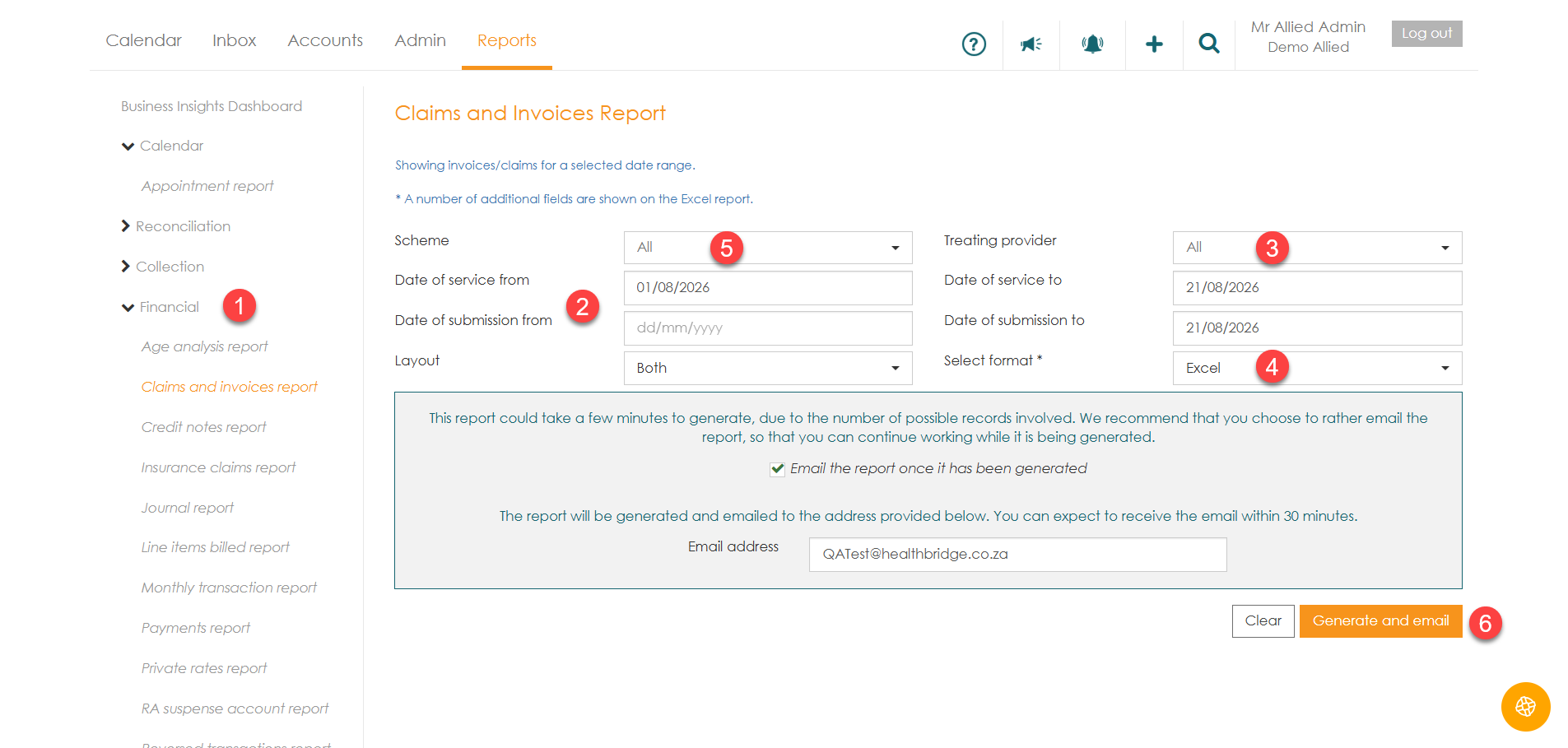
- Navigate to the "Reports" Tab and select the "Financial" tab.
- Select specific periods to align with your reconciliation cycle either filtering the date of submission or the Date of service.
- Use the "Treating Provider" filters to isolate data for specific providers.
- Choose between PDF or Excel as the report format.
- Apply additional filters to isolate specific data e.g specific Medical Aid/Scheme or cash .
- Select "Generate and email" option and the email will be emailed to the user.
Below is a list of other reports that can be helpful within the practice.
| Report Name | Functional Focus & Strategic Value |
| Daily Transaction Report | Found under 'Operational'. Essential for end-of-day provider reconciliation. It verifies all transactions captured that day, grouped by provider, ensuring daily clinical work is billed. |
| Monthly Transaction Report | Found under 'Financial'. Provides a summary of all medical aid transactions for the month. It is the primary tool for high-level month-end financial reviews. |
| Payments Report | Audits the actual cash flow of the practice. Provides detailed or summary views of all captured payments, allowing for a comparison of revenue billed vs. revenue collected. |
| Age Analysis Report | Provides a structured view of outstanding balances across different ageing periods. Use the email-delivery option for large practice volumes to maintain system performance. |